Analytics

Monday, September 28, 2015

Why mELTing?

Here's a quickie!

Art with Jennie K started a great linkie where TPT educators share what the background behind their logo is.

About two years ago I shared a blog explaining why I changed my name. My blog used to be called Trying to Teach, and I made the leap to mELTing Activities to show the attitude of the blog was changing.

My hope was, and always has been to share activities that other people can "melt" and make their own. BONUS there's an ELT (English Language Teaching) in the name, which makes it super convenient.

I am still going through the process of changing everything over to one name (Blog, Facebok, Twitter, etc.) but for now I really like my logo :)

Check out the other linked up authors at this InLinkz Link-up

Sunday, September 27, 2015

Sunday Funday- imPress nails

There are lots of options at my local Target
 I recently received some packs of imPress Powered by BrandBacker to try out and share with you for a Sunday-Funday post :)

To start a bit of background: One my first day of teaching in Spain, my Dutch boyfriend clucked his tongue in a disapproving fashion, "You can't go to school like that?" he declared. "What?" I looked myself over in the mirror. My skirt was appropriate, top showed no cleavage, hair was brushed, what more did he want? "Your nails, they're all chipped!"

Really? Really? I was about to teach preschoolers and primary students in Spain (my oldest class was first grade) and he was worried about my nail polish?

I am an amazing teacher. Will anyone be looking at my nails?

That boyfriend is now an ex (not because he insulted my nails I assure you though it was probably indicative of other issues) and I did just fine.

Can you guess my school colors?
That being said, I do find that as a teacher a LOT of people are looking at my hands. I am pointing to specific passages, pointing to cell phones, writing sample sentences, spelling words, and through it all students stare at my hands.

I LOVE nail art, but I don't normally do that much of it. I'll try to do my nails for homecoming at school or to match a spirit day, but I am awful at taking my polish off and it quickly looks like my three year old niece did my nails (it isn't a far off guess, she does do them sometimes).

Nails via my niece
With that in mind, I decided to give imPress nails a try. They seemed easier than painting, would take less time, not require steady or artistic hands, and literally require nothing.

My first imPress set
Unlike fake nails from the nail salon these are easy on AND easy off. Just clean your nails, push back the cuticles, prep the surface and voila. They're on. When you're done with the look, pop them off and there's no sticky residue.

I wasn't used to fake nails, so I found myself feeling a bit awkward with my fingers at times, but overall they were fun to wear for a bit. I stuck with a neutral matte you can see on the right (although it also included sparkly silver accent nails I may break out for homecoming). The price is definitely right. At my local Target they vary from $4.99-$7.99 for 24 nails! I think I saw them at Walgreens for just $5.99


In short, if you're looking to get the approval of my ex-boyfriend, or you just want to have some easy fun, trying out these nails may just be your ticket. They come in tons of shades: whacky prints, glittery solids, or neutral classics.  Pick some up the next time you're out and tell me if your students notice your nails when you're pointing something out. I know mine did!


Checkout more information at http://impressmanicure.com/


Saturday, September 12, 2015

Understanding the Author's Craft by Writing

My school has started a Data Team that is in charge of analyzing the data that we receive from exams and letting us know what we should try to focus more on in our classes. I am not going to lie, this scared me a bit when they started (am I just going to be teaching to the test?), but for the most part, what they have told us are things I focus on anyways, now I just have to add a note to my Haiku saying, "We are focusing on __________ because of _______________."

One of the areas they feel students need more exposure is analyzing the author's craft. I am pretty excited because I have wanted to justify using the National Novel Writing Month's Young Writer's Program, commonly known as NaNoWriMo YWP, in my classroom and now I can.

NaNoWriMo is so easy it is almost hard to explain. Essentially, it is an idea that anyone who wants to write a novel can sit down and do it in a month. For the adult's program, on November 1, participants start writing with the goal of hitting the 50,000-word mark by 11:59 PM on November 30.

NaNoWriMo also has a Young Writer's Program specifically for students!! For students, they can set their own word limit, making it achievable at any age.

My NaNoWriMo
There's a teacher's kit you can buy / get for free (depending on their supply and your location) that comes with
  • An awesome poster for your classroom where students can chart their novelling progress
  • 35 stickers that say "Contents Extremely Imaginative" (great for laptops or binders)
  • 35 "I Novel" NaNoWriMo buttons 
  • One Writer's Emergency Kit (Fun for speaking activities and downtime in class)
But that's not all! There are some different workbooks (for different school levels)  you can download for free or purchase for $10. It goes through some fun ways to introduce your students to plot, setting, characters etc. They also have some lesson plans developed for Kindergartners through High School Seniors.

I won't be using these exactly. I'll be adjusting them so that we can use them to discuss the characters we have read about and analyze how the author has used the skills and methods we are learning about (as well as use them on their own).

I contemplated doing this on Haiku, but I think I will be using the website they have set up where my students can sign up, get motivational speeches, and track their word count. I can also give them announcements etc.

The best part, if your students meet the goal, then they get a voucher to get free copies of their book published and mailed to them. AWESOME motivation.

This will be my first year rocking it, but I'll be sure to post any amazing lessons I come up with while this goes on, and expect a post in December about how it went.

If you've ever done this before or have any pointers, comments below! If you're a newbie like me and you also teach high school, maybe our students could Skype or otherwise collaborate?

Thursday, September 10, 2015

Peer Reviews with Technology

Picture By: Brett Gosselin
Peer reviewing is nothing new. I've been doing it since I was a child and using it with my students since my first year of teaching. However, I get asked a LOT from many teachers, "How do you do it?" I've done it many different ways over the years.

In the past students would have to come into the class with two copies of their paper. I would randomly pass out the papers to the students. If they didn't bring in copies, they didn't get to participate and instead would sit in an "essay writing corner" working on their essay. There would be a worksheet of questions passed out, or maybe the questions were displayed on the overhead. Students, armed with colored pens would then answer the questions as they reviewed the essay. Sometimes this would include specific directions (highlight the thesis, underline the opinion, etc.)

There's nothing wrong with doing it this way (and I could go into more details about it if anyone is interested) but now, like with a lot of things, technology has changed the way I do this.

Before we get into that, let's start at the beginning.

Editing is something that teachers often take for granted. Since we know how to spot mistakes, we assume students can do this as well. After all, if they have learned what we taught them, shouldn't they be able to catch mistakes other students make?

Well, maybe. But for the most part students require some coaching in this matter. Modeling is an easy way to do this, as is having students practice in small groups. Here are some technological tools I use to help my students refine their inner editor (at the end of each suggestion I also give a brief low-tech/no-tech option). I am assuming you are at least vaguely familiar with these sites. If you aren't or are interested on a post on the basics of one of the sites I mention, leave me a comment and I'll put something together for you.

I strongly encourage using "real" examples from students (past or present) as it has really made a difference with my students.
 Kahoot 
Take a screen shot of a sentence (or make a PowerPoint slide and upload it as a graphic) and use it in Kahoot as a picture. Have the question be identifying the error. The answers would be different possibilities. For example, my students are working on thesis statements, so some issues may be: Using personal language, Not being specific Not having an opinion, Not having an explanation.

Alternatively, label different sentences (1,2,3,4) and have students pick the best thesis statement. Be sure to have the, "automatically move through questions" turned OFF. You want to use the time immediately after questions to have students explain why they selected what they did and why.

No Tech? Years and years ago, we did the exact same thing with teachers who would have these paragraphs on overhead projects, now you can make a PowerPoint game, if you are low-tech, or a packet for no-tech.

Socrative
Most teachers I know use Socrative for quizzes or the Space Race. Those are both really awesome tools, but not my favorite part of Socrative is the "Quick Question"

Simply select, "Quick Question" and then "Short Answer." Write an essay prompt in the question blank. I want each student to write only one response and I want their names (so they are held accountable). You can also have them work in small groups and have each group submit one thesis statement. As the results start coming in, you, as the teacher, can monitor and remove any that may seem inappropriate.

Once the time is up (or all students have submitted their attempt) then click "Start Vote" At this point the students will be able to see all of the thesis statements and vote for the ones they like best. Once the vote has closed discuss why the class selected the winner as the winner. Find the one with the least votes, what was wrong with it? This requires very little prep and is anonymous (to the students) so you tend to get authentic responses.

No Tech: Have students write sentences on the board and then discuss them after.

Haiku Discussions
Different options for Haiku discussions
I use Haiku because my school provides it to me, but any discussion board would work find (BlackBoard, etc.) Haiku does offer a free solo teacher plan! You get five classes. More information here

These are great because you have options. You can put students in pre-assigned groups (this can be a great way to differentiate), as a whole class, or individually.


Depending on how you have it set up, you can post a sample paragraph and have students critique it. Then they can take it the next step and re-write it. This is nice because if you are putting them in small groups or as a whole class, the shyer students can "speak up" without actually needing to speak, and the students who don't quite get it can go at their own pace and see what everyone else wrote first (unless of course you want them to take a guess first, in which case click the "Require students to post first" button).

You're also taking it past just identifying issues and seeing if students can actually fix them. Often at this point it is helpful to have a checklist of sorts students can go through to find errors.  This list should probably change depending on what you are focusing on, but I know some teachers who keep the same list throughout (normally elementary when they are focusing on key skills). The list can be mechanics, grammar, or specific to whatever you are teaching. I tend to encourage a mix of question types: Yes/No, Scale, and Open Ended. You'll be surprised at the answers sometimes.
  • Does every sentence start with a capital letter? (Mechanics)
  • Does the first sentence grab your attention? (Essay Format)
  • Does the essay make sense to you? Why or Why not? (Opinion)
  • What suggestions could you give the writer? (Really Open Ended)
Sidenote: Haiku Discussion boards are also really easy to grade. After the discussion closes I just pull up the list and I can see (by student) who wrote what. Normally I give a flat participation grade (they did it: full points), but I do make sure to skim to point out particularly good comments.

No Tech? You can of course do this in small groups as well without the technology. Pass out copies of the paragraph have them set the tables together and answer a set of questions as a team. Share their answers with the class, and then write a fixed version of the paragraph individually

PeerMark / TurnItIn

Two years ago I posted about free plagiarism checkers. That's how most people know TurnItIn. However, as much as I do use TurnItIn now, I actually LOVE them for their PeerMark grading. Never used it? You should check it out!

This is the "bigger" assignment. The first time we do this I jump in with full essays, though you can always have students start by just reviewing paragraphs or even sentences if you want!

There may be free versions out there (if you know any leave a comment, and I'll add it here), but I've only ever used Peermark.

Students turn in their papers the night before or morning of. You CAN have them turn the papers in the first thing in class, and just select, "randomly assign." Peermark will randomly give your students different essays and you're set. However, I prefer having some time to look over them.

You also have the option of going through and assigning them. For example, I teach many ESL students. In most cases I want students looking at the paper of someone who doesn't speak their language. For example, Spanish speakers to look at Chinese speakers' essays. This helps them because speakers of the language tend to make the same mistakes. Sometimes they even use words that they think are OK, but really don't exist. Just the other day I had a student tell me, "I hope you understand my Chinglish." So when I get to pick the pairs I can make sure the student will get the most help possible.

Depending on the student I may also want them to grade the paper of someone who write really well. This way they get to see a good model, and it tends to be easier for them to mark (less errors). 

I can also exclude papers. For example, in the class I'm teaching right now one of my students has completely copy and pasted his entire essay from the website online. I don't want anyone else to peer review this.

Finally, my FAVORITE part of using PeerMark. When I did these on paper if you didn't come in with your essay, you didn't get points. You also didn't review another student's paper. I LOVE peer reviewing and think it is a GREAT learning experience. With PeerMark I just need to check the box, "Allow students without a paper to review" and I am set! They don't miss out!! Though they don't get the help of having their paper peer edited.

As for grading, you can make this as hands off as you want or fairly specific. I make a list of questions my students go through as they grade. As with the list mentioned in the discussion boards, it changes a bit with each essay. This is shown on the screen as the students mark. In this example to below, the questions are mainly scale based (5 being awesome, 1 being needs a lot of work). Students answer the question and then leave comments on the paper if needed. For example, in this one I asked a question about the "Author Work Tie" and "Does it mention the author, title of the work, type of work, and how it connects to the thesis statement?" This student-editor gave the student-writer a 2/5 and then left a comment about how the summary was too long. She also answered #5 "Overall how good is the introduction" by saying, "the introduction does tells [sic] me what the rest of the essay is going to be about but the Author, work, tie is very confusing"

I love peer editing. I really really do. Students learn to see what they're seeing in other papers on their own. Its really easy for me to say, "okay don't do that, this, or the other thing," but students don't usually learn that way. I can take it up the net step, "Let's all do this together. What did we do wrong?" But when students actually have the question in front of them and then can find the examples on their own it really takes them to the next level on Bloom's Taxonomy.

It makes them think! They also catch a lot of little things that I always find interesting. There is also an option I really like to use which is having students do self reviews. As a teacher, when you create the PeerMark assignment, you can decide how many papers you want a student to peer review (I suggest at least two) and if you want students to complete a self review as well.

If you choose this I strongly encourage you (and students) to do it AFTER they have done the peer reviews. This way they have seen how other students do it and have the chance to reflect on their own work. Basically they can say, "Okay well now that I've seen other peoples essays what do I think about mine?" This is a really awesome opportunity for them to point out anything they might have learned and it's especially interesting to compare it to the results they will get from students.

I try to give students two days to look over the suggestions made by their peers before having them turn in their paper to me. This means that the first time I grade it they've gone over it and two other students have gone over it. Not only does this mean they learned more it also typically means my grading is a little bit easier because some of the bigger mistakes have already been caught.

This post ended up a LOT longer than I anticipated, and I could go on, but I'll stop. If you use peer reviews in your class, share how you do in the comments, and if you have any questions just let me know!

Wednesday, August 26, 2015

Workout Wednesday - Resistance Bands

Not all working out happens at the gym!
I'll admit it. I've really slacked off when it comes to workout out! In Mexico I was always WALKING somewhere, but now, I seem to be driving everywhere. That, and the stress of starting a new school year were not good for my body.

So, this year I have my school year resolution! I have to do SOMETHING active every day. In can be ANYTHING. Shopping, walking an extra lap around the school,  pedaling a bit, doing crunches... anything, but I have to do it with the intent of being active. No thinking, "Well I played with my niece earlier so that counts." This has to be something I am really thinking about. If I purposefully jump in the pool to be active with my niece, it counts.

I haven't been the best at it, but part of what has helped me is I am starting to do a lot in my classroom.

My students went one-to-one this year which means that they have their own laptops in class. This means I am getting a bit creative. We're doing a lot of videos (animated and live). This is great, but it means I have to spend a lot of time sitting down and watching them.

Ugh, more sitting time right? Kinda. First off I don't need to be sitting to watch videos. I can stand and watch them while actually moving! Reference ID: pmdd6e83b6da55d90f5740e0dd3f3e5a13

Click this image to go straight to Amazon
See I recently got these resistance bands from Egnergy fitness for free to try out and let them know what I thought. They are pretty cool! Super easy for me to pack in my purse (or even pocket) and take wherever I am going. While I have done a bit with the home-school and back, now these pretty much stay in "my" class drawer (the one with my coffee, Chapstick etc.). When I am about to start grading videos, I just pop out my resistance bands and watch while doing something.

What do you do with resistance loops? Tons! I found some YouTube videos I like, and there are some tips on random websites as well.

An easy way to use the bands is "lateral walking" Slip one side around one ankle and the other side around the other loose but secure. Now move your right leg to the right tightening the band, then move your left leg close to your right leg (basically walk sideways). The resistance makes the walking take a bit more effort! However, the action is easy enough it doesn't require a lot of my focus. There are also workouts that focus on my weak upper arm strength, (a big one for me). I've only been using these about a month, but in a few cases I've found that I need to start selecting higher resistance bands (as the lower ones just don't push me hard enough). I am IMPROVING!

Now if you already have resistance bands, or can snag some from a friend, I am sure they're awesome and will work great. I've never used any other brand, so my statements are only valid for these.

Here's what I like:
  • They come with a great warranty (no being afraid it'll snap and I am done)
  • They have five different strengths (I an adjust resistance as needed)
  • They are ridiculously easy to transport
  • The different colors make it easy for me to grab one and not have to look and read carefully
  • They let me do lots of different activities (it isn't just arms or just legs)
  • They are thick so they don't cut off circulation or pinch when I am working out
Normally priced at $50, these resistance bands are only $16.75 now, and (here's the good part), I am hosting a giveaway! That's right, you can get these for free! All you have to do for a chance to win is comment below with how you fit your workouts in. It's OK if you haven't been fitting your workouts in this year, just share what has helped you in the past, or your plans to change your habits. Anything that may help another teacher improve.

There are other opportunities to increase your chances to win: answer a quick survey about when you workout, follow me on Twitter, or like Egnergy Fitness on Facebook.


Tuesday, August 11, 2015

Back To School: Tech Tuesday

What is up with all of these back to school posts?! I know we hate to see out summers shrivel away, but the truth is, I am already back in the classroom. This week is just orientations and meetings, but my summer is pretty much gone.

This post is about some of the technological bits and ends that I use in my class. It isn't about everything (I don't want to bore you to death). I stray away from obvious things like my laptop, and try to focus on smaller more random tech tidbits.

Disclaimer: The factory pictures of the product  below (not the ones of the products in my class) will take you to the Amazon page where you can purchase them. They are affiliate links, so I do make a small percentage off your purchase. I am sure there are other amazing versions of the products I mention, and if you know of one you like better feel free to leave a comment. I was also lucky enough to receive some of these products for free or at a discounted price to evaluate. However, I would NOT include them in my blog if I didn't think they were awesome products)


1. Bluetooth Speaker
I got the blue speaker to match my school colors, but it barely matters because this thing is so small it is really not a distraction.

I have a reward where students can create their own YouTube playlist and I'll play it the next class. I call it "DJ for a day."  They love it! I used to have it playing from my computer (which hooks up to the class speakers) but I moved it to my iPad for convenience. I can still get a powerful sound out of it with this speaker. Awesome.


2. PowerPoint Remote


My students LOVE PowerPoint, as for more, it isn't my favorite presentation platform, but it can still add some great visuals to student presentations. The problem? Moving from slide to slide. Students who try to navigate the PowerPoint themselves end up stick on the computer, and those who try to get a friend to click through slide spend most of the time saying, "The other slide, no before... I wasn't done!" UGH! Then I discovered the PowerPoint remote! Ridiculously easy to use. There is no software and less than five buttons on the whole thing! It even comes with batteries. You attach the USB to the computer being used, switch the remote on and that's IT! This lets students focus on their presentation and allows the technology to help rather than hurt them. Plus, it has a laser pointer. Despite all of the advances in technology, students are still amused with a laser pointer.


3.Kitchen Timer

Sometimes lo-tech is the best tech!

I do use an online stopwatch most of the time, but this is great for small groups, individual work, or just a change of pace for the whole class.

My favorite part about this timer is that it is magnetic. My classroom has magnetic whiteboards, window frames, and doors. I have lots of places to stick this fella without worrying about him going away.


 4. Multi USB charging station.
Do you Kahoot? Students use their cell phones during break, and (for educational purposes) during class! The batteries can drain rather quickly. My students will have their own laptops next year, but our desks are so tiny that I just know I'll have this conversation
Me: Put your cell phone away please.
Student: Its just charging
Me: Well...put it.... more away!
To avoid this I got a five port charging station I set up on my desk. Students are welcome to use it to get their battery where it belongs, their cell phone stays where I can see it and out of sight out of mind their cell phone proves less of a temptation.

5. Humidifier / Air Freshener

 I teach high school. During lunch (and sometimes at break) the boys play soccer. After lunch they have my class. Do you get where I am going with this? I teach sweaty high school boys. I've already added a welcome mat to help them de-grass their shoes, but I quickly went out and bought an air freshener.

I like the plug in ones because I can boost the scent right before they come in and turn it off over the weekends and at night. Being able to adjust how strong I want it really makes it last longer AND be more effective against my soccer players.

Plus, I like teaching them about studying with associations. Since my class smells like lavender, they should study at home with something that smells like lavender. Then, when they come back to my class the scent will trigger their memories. Cool, right?

If you, or your students, are particularly sensitive to scents, you may want to consider a humidifier.

BONUS Cord Organizers!

While not strictly technical, these make my technological life more organized. With all of the laptops, tablets, and other random devices I have in my class, cords can get a bit cluttered. These cord organizers are awesome. I can stick them anywhere to make my cords easily accessible. I use the black ones for my desk, and the colored ones for the students' station.


So there we are! My favorite (random) technology in my class. What about you? What's the tech item you use the most? Or the one you're surprised you love? Going the other way, what technology disappointed you?

Tuesday, August 4, 2015

Graphic Organizer Station

I've said it before, but I'll say it again, I was NEVER a huge fan of graphic organizers. they just didn't work for my brain. Nonetheless, I completely recognize how they help students sort through the ideas going through their brains. Often in class we'll all do a graphic organizer together, but I also know some students who would like to use them more than others.

Thus, I introduce you to: My graphic organizer station.

Nothing fancy, I think I got the "File Purse" at Target and the manila files I scavenged from a teacher who was retiring.

Some of the graphic organizers are ones I've created myself (like the Venn Bow Tie) but a lot of them I got from Love Learning with Liana's store. It has eight different graphic organizers and they each made the cut!

Let's take a closer look at my station

Fancy tape = Decorating :P
1. Before anything else, admire my plant. It has been two weeks and it is still alive!!!

2. It has a quick note on what graphic organizers are and that they may be used any time a student thinks it will help. No fancy font, but I used some gold tape, so that counts as being decorative, right?

3. IMPORTANT It has a note about what to do when they take the last graphic organizer. They are to hand me the empty folder (or put it on my desk) so I can make more copies before the last class.

But how am I supposed to know what copies to make from a blank manila folder? I am glad you asked.

Labeled Tabs
Worksheets taped to the front
4.   In addition to the "title" of the graphic organizer written on the tab (yes I have the handwriting of a five year old boy), I also have the worksheet itself taped to the front of the folder. That way I know EXACTLY what worksheet I'll need to make copies of. This is important because I have several copies of slightly different graphic organizers. 


Compare and Contrast 1
For example you can see the I have three different compare and contrast worksheets. One (above) is just columns for the students who don't really like graphic organizers, but know they need to sort their thoughts.  To the left you can see I have the standard Venn Diagram (from Liana's packet). However, if you follow this blog at all, you'll know I am not a fan of Venn Diagrams, so I also have my Venn Bow Ties (below). 

Since these are all about what helps the student the most I provide all of these options and students can pick the one that works best for them.
Compare and Contrast 2

While the main idea of these worksheets is to help students help themselves, you can also use it as an easy way to differentiate a class. If you know one student struggles with finding the author's purpose, and you know that's a task they'll be doing in class, hand them a copy on their way into class (or while they are working). They'll appreciate it, and they'll be better equipped to answer the question when they get to it. 

Any graphic organizers I am missing?  Do you have a graphic organizer station in your class?

Looking to stock up on some organizers yourself?  You can grab my Venn Bow Tie for free here and Liana's are currently free (no idea how long that will last) here.

Monday, August 3, 2015

California Teachers Summit - Teachers Make a Difference

Today I was lucky enough to attend the California Teachers Summit.

I am a HUGE fan of webinars, MOOCs, and learning online. However, there is something different about being physically in a room with other teachers who are excited about learning and sharing.

We heard from some AMAZING speakers. I went back and forwards between what I want to share here. Do I want to share my emotions, ideas, and general feedback? Or let you know about what exactly happened.

In the end, I did what this blog is all about and melted the ideas together. So this blog will cover what I heard, along with a brief takeaway. There may be

7am- I found the breakfast, coffee, and free parking :-) I found a table with another teacher. In the net hour we shared our random paths into education, our mutual struggles, and made "new" friends. I saw, "new" because it turns out one teacher taught my boyfriend at my high school, one taught with my mom, and I had just met Liana online (checkout her blog here) The teacher community is a small one!

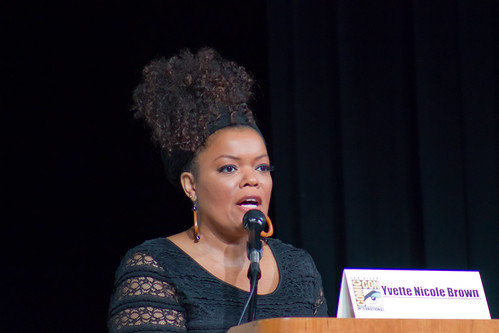
Yvette Nicole Brown
Photo by vagueonthehow on flickr
The first keynote speaker was Yvette Nicole Brown, whom many people know from Community. She talked about how friggin' awesome teachers are. She declared that she is a "lover of teachers" "celebrator of teachers" "encourager of teachers" and a "cheerleader of teacher." Let's face it we are! At one time or another it We have all been known to go above or beyond for a student. Sometimes it feels like all we do is go above and beyond for our students. She reminded me that it is worth it! All of the little things that we do add up! She spoke of small things (a teacher remembering her name) to larger things (a teacher buying her a plane ticket to California). She reminded me that part of my job is to push them past the here and now to the there and future. As she reminded me of her childhood, and how students can't see anything other than what they see in their own day to day life.  Finally, she told us the importance of having a tribe of people who support you and whom you support. This is something I hear a lot lately. Teachers encouraging other teachers to support one another. I am slowly getting together a group of teachers I know are a great help to me, and I hope I am doing my part to help others as well.  
But our salaries well make up for it :-P
THANK YOU Yvette for being a cheerleader and reminding me that what I do is worth it. It reminds me a bit of an exchange I watched in NCIS the other day. One character is discouraged because despite all the god she tries to do she still sees so much bad. Agent Gibbs responds, "You do something good now, you're not always around to see the difference it makes later." I think that is a LOT of teaching. As much as I would love to say that every student I try to help shows me that they appreciate my actions.... well that idea kinda makes me laugh. In fact, quite often the students I try to help the most are the ones who are convinced I am out to get them! With time, I get sporadic e-mails thanking me, but it is really important to remember that I am only planting seeds...I don't always get to see what grows.

Don't just take it from me check out what other teachers found the most inspiring:


There will be another blog on the other speakers and sessions I attended coming up soon!

Saturday, August 1, 2015

August Writing Deadlines

For those of you unaware I am a BIG believer in allowing students to do assignments that LEAVE the classroom. The first of every month I try to post some opportunities for your students to show off their writing skills and maybe get some recognition. All of these deadlines are in August! If you start the school year this month, it could be a great way to start off the semester. If you don't start until September, consider including these with your "Welcome Letter" to the parents.

August has some GREAT writing opportunities for your students!!!!

1. Do you teach students between 6 and 14 years old? Have they read any of The Princess Diaries books?  Here's a contest that's perfect for your students! They just need to write an essay (500-1000 words) that answers the question "What would you do if you found out you were royalty?"  The grand prize winner receives a $2,500 Pottery Barn gift card and a signed copy of  From the Notebooks of a Middle School Princess. Deadline is August 31st

Guidelines and submission details are available here.


2. How many times have you heard your students talking about their pets? Mine seem to do it all the time! Before August 31st Chicken Soup for the Soul is accepting submissions on the topic of Cats or Dogs. They want to read about stories about people's cats or dogs (up to 12000 words). All tones are appropriate as long as they are inspirational! They are doing two different books, one about cats and one about dogs. Your students can submit to just one, or to both (depending on the furry stories they have to share). If a story is selected and published they will be paid $200 one month after the book is published. Plus, they get ten free copies of the book to show off as well (see if they'll give a signed set to your class library).

Guidelines and submission are details available here

3. The role of women has changed throughout the years and many would argue is still changing! Chatter House Press is holding a Mini-Memoir Essay contest for women called, "Biting the Bullet," about women who define courage. It is only for women who are residents in the US and over the age of 18, so sadly most high school students won't be able to enter, but I wanted to include it in case you teach older students.  Your students' essays should show how a woman (or women) demonstrate(s) courage in daily life, or regarding a specific event. The deadline is August 14th. Prizes include publication and copies of the book.

Guidelines and submission details are available here
The Farmer's Lad via AntiquePrints

4. Do your students ever get depressed because they don't think they can meet the 1,000 word count minimum some contests have? Here's the PERFECT competition for them.  They are looking for a short story told in ONLY 21 words. The theme is, "Backyards and Porch Swings." Chosen authors don't win a cash prize, but they do get bragging rights and possible publication in the literary journal From the Deaths.  This deadline is hard to pinpoint and it stops when they receive 200 submissions, so as soon as possible is best. 

Guidelines and submission details are available here.

A cover of one of the issues of The Blue Earth Review
5. The Blue Earth Review is part of Minnesota State University. From what I can tell this is open to anyone, but please evaluate the guidelines on your own. It has two opportunities to get writing recognized for free. The first is the creative nonfiction contest. The text cannot be over 750 words. Students may submit more than one piece, but they need to have them in the same document.

The  other option is their poetry contest. Students may submit up to three poems (again in a single file).

Both contests include publication in the Blue Earth Review and a $500 cash prize. The deadline to submit is August 14, 2015.

Guidelines and submission details are available here.

There you are five ways to get your students motivated to write for more than just a grade, get a chance to experience writing for a different audience, and see that writing isn't just for the classroom. If you know of any others or your students really have fun with one let me know in the comments. If you find one of these doesn't work, also let me know so I can update this list.
Related Posts Plugin for WordPress, Blogger...