

Using YouTube students create Playlists that are meant to show that they understand the texts from class.
Example questions to create a playlist could be:
- Create a playlist that shows a character developing throughout the novel
- Create a playlist that you think a character in the story would have enjoyed.
- Keeping in mind the theme and tone of the story, select 10 songs that accurately fit what you think the author wanted the readers to feel.
- Create a playlist where each song represents a different character (or location) in the book.
- Consider the story is turned into a musical. Find five songs that characters could sing at different points in the book.
Pros
- Practice on the computer. I know it seems silly, but a lot of my students still need that.
- For some students it is faster to just do everything on the computer and on the same program (no switching to glogster to make a poster, you search for the song on YouTube, add it to the playlist on YouTube, add a description on Youtube, etc.)
- Some students are just more motivated to do an assignment using YouTube. To them YouTube is fun and they watch videos anyways, so this assignment sneaks in there being an assignment, but not entirely boring.
- Ads. Youtube is filled with ads.
- YouTube is often banned or limited at schools.
If anyone else has used YouTube playlists in class and would like to share their experience I'd love to hear about it! Drop a line in the comments to share your knowledge with the rest of us.
For those of you new to using YouTube, I've included two tutorials below. I personally don't like watching videos (I read faster) so below I've included a picture tutorial and a YouTube video walking you through how to make a playlist. Remember, clicking on any of the pictures will make it larger, so you can take a closer look.
Step 1 Adding to / Creating a playlist

Step 2. Naming and Privacy


Step 3 Playlist Information
This section is great for students to explain how they think the songs connect to one another the the book. They also have the chance to explain why they picked certain bands, or how they felt about this assignment. You may want to mandate that they write a paragraph, or let them use it as they wish.
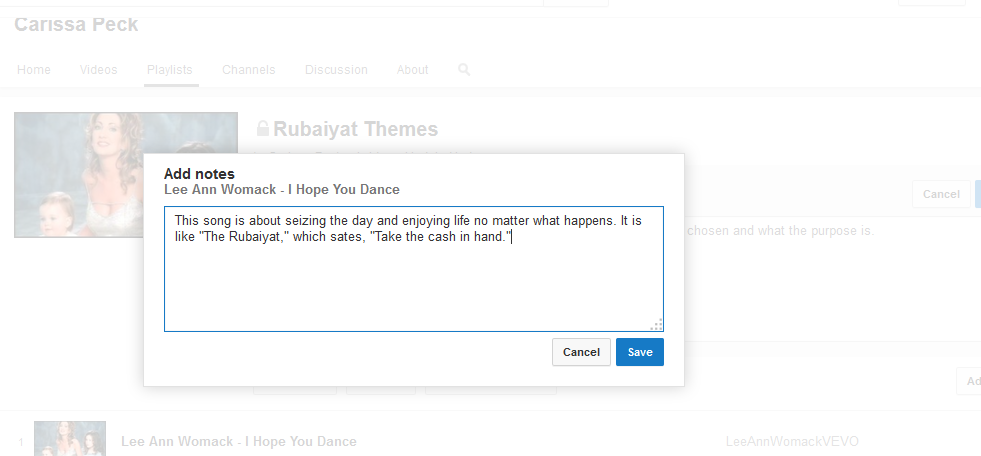 Step 4 Song Information
In addition to writing about the whole playlist, students have the chance to quickly (in 150 characters or less) explain why they choose a song. I usually require my students use a quote here, but you could alter the requirements as you saw fit.
Song 5 Sharing
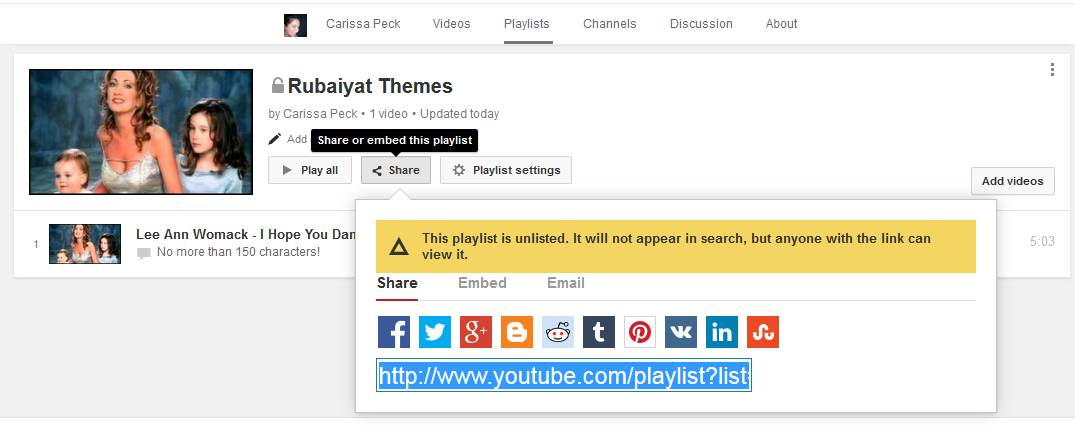 Your student has made a fantastic playlist...now how do they get it to you?! Just click the share button to get a link. They can also embed the playlist in a blog if you have students create blogs.
If you prefer videos check out the YouTube video:
Voila! If anything is unclear, or you aren't sure why it was done a certain way please ask me! I am happy to help you out so that you can try this out with your students!


