Analytics

Thursday, February 19, 2015

Vocabulary Group Work

Happy Dance
Today was a good day!

I've been playing around with different seating charts since the beginning of the year. It has been tumultuous; we have had new students join the class, and some students go back to their home countries. Plus, the class has some very strong personalities.

Many of my past seating charts have been OK, but today I implemented "the one." It just worked! Students were collaborating on tasks (not just dividing up questions), they all stayed in English, and, most importantly, they actually stayed on task!

I was beyond thrilled. Today's lesson was a simple one, but to see it go so well made me ecstatic. My class is reading The Great Gatsby. Since this is a rather difficult text for ESL students, I took some time to pre-teach the vocabulary. I picked ten words that they need to know and we used them in the activity.

STEP 1- Modeling
I select one word from the chapter and use it as a sample. 

Contemptuous: showing contempt; scornful.

Since we can't use a word to define itself we look up contempt together

A combination of disgust and anger

Now we make a definition that anyone in the class would understand: When someone/something shows disgust and anger towards someone or something

To show they understand the word, they need to create a dialogue using the word. 
  • I usually need to remind them that dialogues are exchanges, meaning at least three lines between at least two people.
Then we "play" Whose Line is it Anyways? I ask the class what type of people would be talking that may be contemptuous. They shout out ideas, and I pick the ones that are the most outlandish (or easiest). Then I ask them to shout out a situation. They usually can't just shout out answers, so this is fun for them, but if you want, you can use this as a time to get shyer students to communicate by calling on them. 
  • Me: What types of people do we want to be talking? Who would make you feel contemptuous or be contemptuous?
  • Student 1: Teacher 
  • Student 2: Coach
  • Student 3: Dentist
  • Student 4: Doctor
  • Me: Awesome! Let's go with dentist. Where should the dentist be?
  • Student 5: Office
  • Student 6: Restaurant
  • Student 7: House
  • Me: Ooo, let's have him at the restaurant, So, I can say:

Waiter: Would you like to see the dessert menu?

Dentist: Is there anything sugar free?
Waiter: No, we believe in using lots of sugar.
Dentist: How dare you do such a thing? Sugar is a silent killer!
Dentist's wife: Dear stop being so contemptuous to the waiter. It isn't like he makes the menus.   

Once they understand the concepts

STEP 2- Assignment 
  • Each group is assigned one word. Be sure not to assign all of the words. You'll need one word not assigned to a group for Step 3. 
    • They need to look up their word, define it, and create a dialogue that they will present to the class.
  • Dialogues can be on ANY topic. This freedom really lets students have a little fun with it.
In my class I try to focus a lot on the difference between, "dividing and conquering" and collaborating. This is best done as a collaboration! Everyone pitches in and brings their own ideas to the table.
STEP 3- The Twist
  • Take the word that you haven't given to a group and tell the class you will be modeling what they will present to the class.
  • The twist!
    • Teacher in a deeper voice: What makes you think your boyfriend is cheating on you. Did he tell you? 
    • Teacher in a higher voice: No, but there were clear intimations
    • Teacher in a deeper voice: Like what?
    • Teacher in a higher voice: He didn't always answer his phone, and he stopped using my name. He always called me, "Baby," or "Sweetie."
  • Ask students what they think the word intimation means? 
    • Field guesses and help them come to the correct definition if they can't figure it out on their own.
  • Explain that they will be presenting their dialogues FIRST and then helping the rest of the class figure out the meaning. 
    • Give them a little (I did two minutes) more time to make sure their dialogues are ready or to practice.
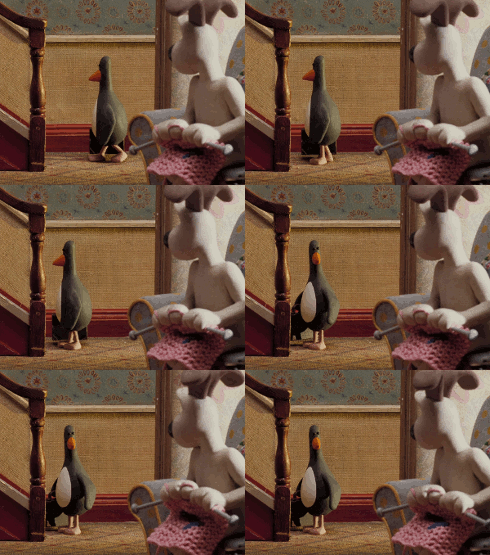
This is the part that makes the lesson really interactive. Students aren't just presenting to the class; they're helping them discover what the word really means. The rest of the class isn't just taking notes; they are trying to guess!

STEP 4- Listening

  • As each group presents, the rest of the class listens and guesses what the word means.
    • I hardly had to give any guidance today, but feel free to help your students focus or give them clues if they struggle. 
STEP 5- Final Product
  • Students take all of the words presented (including the two from their teacher) and make either a short story or another dialogue. 
    • If you want to add a technological aspect, you can have them make a comic stop on bistrips
    • There's a short story app for Windows 8.1 and higher called Chekov
    • You can also choose to make it a speaking task by using the sock puppet free app 
    • And many many more! 
  • I refuse to give more help with the definitions. If a student asks what a word means, I ask the group who originally presented on it to help. Otherwise, I point out the dictionaries sitting in the middle of the group's table.
Voila! Your students should feel fairly comfortable with these words, They've worked in a group, presented to the class, listened to others, and practiced writing.

Again, this isn't a new concept or activity, but it worked so well today I wanted to share it.

      Wednesday, February 11, 2015

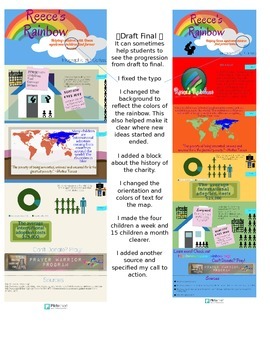
      Infographic Project - Charity Based Research

      My students have done infographics before to practice argumentation and essay structure. This project uses infographics again, but this is a different project that is much more non-fiction and research based.

      This project has tons of technology and websites.

      I am really excited about it, and about being able to post about it. In total the charity infographic project took three classes, but there was very little homework. I am listing all the steps together here and you can divide them as needed, take steps out if wanted, or add to it. I actually did a bit more (e.g. I worked on using notecards) but here are all of the infographic based steps:
      1. To start, I pass around a sheet of statistics on a topic we are covering: in this case GMOs.We quickly review the statistics and go over whether they are for or against GMOs. Then, I ask students how interesting that was. Most of them say not very.
      2. Using infographics I found online earlier, I show them 10 different GMO statistics we go over each infographic and decide: how does it look, how are the facts, and is it for or against GMOs.
      3. Students on their own think about what they liked about infographics, and what they didn't. What seemed to work, and what fell flat. After some individual work I let them share with a small group, and then we discuss it as a class.
      4. In small groups (2-3) students are assigned to select an infographic about anything they want. They need to know 1. Why they picked the topic 2. Why  they liked it
      5. Students made short presentations on their infographics.
        1. The goal of 1-5 is to introduce students to the topic of infographics and have them get a feel for what they like and don't like. What colors don't work well. When is too much on an infographic too much? Is white space good or bad? etc.  For me, 1-5 took one 90 minute class.
      6. Finally, I let the students know that they will be creating their own infographic on a charity. 
      7. I gave them an approved (they had to be within the guidelines of the school) list of charities and told them to pick whatever one they wanted. They could also pick a different charity, but the school administrators would need to approve it. In groups of two-three students selected a charity.
      8. We went over good sources vs bad sources (we covered this before) and I let them research away. If a student started researching and realized they didn't like their charity, they were allowed to switch.
        • My students spent an entire class researching. While some finished early, most were really working the whole class period. For fast finishers however go to step 9.
      9. After I noticed some students had quite a bit of reliable research ready, I showed them http://piktochart.com/. There are other infographic sites out there, but (for reasons I will discuss in #15) I prefer to use this one. If done researching, students could create an account and begin playing on the site.
      10. I show them an infographic that I made on a charity (I selected one they didn't choose as an example). We go over what we like and what we don't like. We look at the organization pattern, the charts, the visuals, the colors etc.
      11. Examine and review infographic assignment.  Be sure that students understand everything they are expected to do.
        • Using the rubric on the assignment have students grade my infographic.
          • I usually make a few typos, or choose a hard to read font to make sure they give constructive criticism.
      12. Give a quick tour of Piktochart. I like having students learn on their own, but giving them a good start is usually a solid idea.
        • How to sign up
        • Where to start
        • Free vs Paid
        • How to undo
        • Where to find pictures
        • etc.
      13. Allow students to work on Piktochart
      14. Have students submit their Piktochart to me. I make corrections and give it back to them. 
      15. Model Presentation (This is why I like Piktochart! Some other sites have this option as well though.)
        • Using Piktochart's presentation mode I give a presentation justifying why I selected my charity. 
        • I am always sure to make a few easy to spot mistakes so students can correct me
      16. Have students grade my presentation
      17. Let students create their own presentations
      18. Students present their infographics to the class
      19. While presenting, students evaluate the infographic and the quotes
      20. Finally, my students evaluate themselves.
      DONE...for now. There's actually a final part, where my students raise money for the charity, but I'll save that for another post.

      For now, I'll show you some of my favorite infographics my students created. Click on the charity name to see the whole infographic.

      • San Diego Hunger Coalition was a group that really took advantage of all piktochart had to offer. They had fun picking different backgrounds, and they stuck to small chunks of text (rather than writing everything down). This group was a clear division of labor. One person researched cool facts and statistics, and the other person played on Piktochart until they found the perfect look. Normally I am more a fan of collaboration (rather than divide and conquer), but this group was persistently communicating, so it seemed to work well for them.  
      • L'Arche This student really had fun with the graphics. Every block in her presentation has the same theme, and all of the visuals go with one another. She also added little details where possible. For example, one of the graphics was of a person and it didn't include eyes, so using the shape tools she added them. Her partner missed a few days of school, so she did most of the work on her own, and I was really proud of the final product.
      • Build a Miracle Group was big into incorporating the graphics into the block. That is, nothing was ever stand alone, it was almost one big picture. They also found really great facts to support donating. This group was also one of the most prepared groups when it came to donating. They really worked hard to know their stuff and came across as quite knowledgeable.
      • Finally, Las Hermanas San Diego was a really fun group! They went outside the box a bit, and used the graphics in ways that weren't normal. For example, they used rectangles as surfboards, and put people in normal clothes standing on them to make surfers! Adorable!
      Thanks so much for sticking around for the whole post! This really is a fun project it helps teach students about:
      • the good charities do
      • research skills
      • visuals
      • learning how to use new computer programs
      • working in a team
      • organizing their thoughts
      • evaluating one another
      • self evaluating
      And of course, the writing and speak skills I am focusing on in my speech class were there (grammar, intonation, transition words, volume, etc.)

      I have the worksheets I used available for purchase at TeachersPayTeachers  if you are interested. You can also download the preview for free to see part of it.

      Sunday, February 8, 2015

      Valentine's Day Goodie Bags

      Assembling all the goodies
      A finished bag
      I just started this job at a new school, and Monday the English department has a meeting.

      Since Saturday is Valentine's day, I thought it would be a nice time to show everyone how much I appreciate them, by making little goodie bags

      I originally was going to make cupcakes, but so many people are watching their weight, I decided that candy was better. This way, if they don't want it, I am sure they can find a several students to reward with sweet treats!

      They aren't the cutest, and they aren't the most creative, but I thought I'd share them here.
      • Each person got: a pencil sharpener in our school colors
      • A cute little Coca-Cola glass
      • Cadny (to fill the glass of course)!!!
      • A monogram notepad made from their initial
      • A note thanking them for being so sweet

      If you were interested in making similar bags for co-workers, students, or really anyone, I made a PDF with the graphic you see above (free fonts via fontspace) you can download it for free here.

      Do you get crafty for Valentine's day? Or stick with something simple? Ignore it completely? I'd love to know more about what other teachers do.

      Tuesday, February 3, 2015

      But first, let me take a #Shelfie

      I am an English teacher. I encourage my students to read for fun, give students books as presents, and love when I find a student sneaking a book home from my class library.


      I believe that a love of reading is one of the best things any child can get from school.

      It doesn't need to be the classics, reading Ender's Game is just as valid as reading Pride and Prejudice. In addition to being a fun way to spend your time and learn, reading gives kids tons of advantages that will help them after they have finished their education in school.

      Reading gives people:
      • higher vocabulary
      • more empathy
      • improved grammar
      • lower stress
      • less likely to get Alzheimers
      • improved analytical skills
      • better writing
      • and SO MUCH MORE 
      Words Alive is an organization that has been around since 1999 when Leslye Lyons started it on the belief that lifelong learners (the kind who transform their communities) all start as readers.

      They create reading groups for adolescents, help families who don't normally introduce books to their children and so much more.

      Now Words Alive is active in 70 School and Community Site. They have 500 volunteers, and have served  7,600 children, teens, and families!

      Don't take my word for it! You can learn more about this organization here: www.wordsalive.org. If you are a San Diego reader, you may even want to call them with questions or to get involved:  858-274-9673.

      Words Alive is asking people to show how important reading is to them. They're requesting that people take a #shelfie to share their love of reading.

      It's easy to do, just follow these steps:

      Step 1: Take a #SHELFIE
      Take a selfie in front of your bookshelf. We want to see you, what you’re reading and how books have a place in your life.

      Step 2: Share your photo (You can tag me too, and I'll RT or share your photo as well!)
      On Twitter @WordsAliveSD / @mELTingTeacher
      On Facebook @Words Alive / @TheMeltingTeacher
      On Instagram @WordsAliveSD / @meltingteacher
      Use the following hashtag: #shelfie

      Step 3: Invite your friends (and students) to join the movement and take a shelfie.

      Finally, if you can, Help Words Alive build the home libraries of the kids and teens we serve. Follow this link for their Amazon wish list of titles.

      I can't wait to see everyone's awesome shelfies :)

      Monday, February 2, 2015

      New Learning Tools in e-Learning


      Today's guest post is written about e-learning tools! I am a huge fan of taking full advantage of the many tools the internet makes available to teachers, and I hope you'll find David's blog helpful.

      Anyone involved in education has been privy to the changes over the past ten years with regard to online learning. New mobile technologies and e-learning has changed the landscape of education forever. Of course, there are still some stragglers out there who have not bought into all of the benefits that the e learning world has to offer, but they are missing out and soon enough will have to join alongside the rest of us.

      In 2011, seventy seven percent of corporations in America were utilizing online learning. This is largely dramatic increase from the mere four percent that it was in 1995. This means that companies are getting involved in online training due to the diminishing technological barriers and shifting customer priorities.

      The industry for corporate training is worth two hundred billion dollars, in and of itself. Of this, fifty six billion represents e-learning. This is expected to grow into one hundred and seven billion dollars by 2015. This makes e-learning one of the fastest growing markets that is continuing to make its stride in the education industry. The reason for this is because of the many new learning tools.

      E-learning is growing and it is growing among all age groups. In fact studies indicate that e-learning has grown for older adults much more than among younger children with the average online user age being 34. This key in mind there are many new technologies which have created learning tools applicable to all grades and all key demographics.

      Learning tools are tools used for personal learning or professional learning. They can also be used to teach or train individuals. Key findings suggest that there is an increased consumption of IT and learning. Learning tools and working tools are merging with personal tools due to the fact that free online social tools are dominating the online learning field. Now professional and personal learning is under the control of the individual. Educational and training tools remain the top trending category for online learning with video and image tools in second. In third place is communication tools followed by networking and other platforms for collaboration. Blogging and web tools are ranked the fifth trend in the industry.

      Within the educational industry online there are elearning authoring tools such as the elearning software Articulate. There are also tools such as Udutu which is collaborative course authoring software as well as Camtasia which is a screencasting tool. There is a simulation authoring tool called Adobe Captivate and a course manager called iTunesU. Then there are quizzing tools. Quizlet is a tool that allows you to study games and use flashcards. Socrative is a student response system that is quite new. ProProfs Quiz Maker is another new tool which acts as an online quiz maker.

      There are many e-learning platforms available to users. Moodle is a course management system that is now widely available to educational and corporate entities alike and Edmono is an educational social networking platform. Coursera is an MOOC platform that companies and students can both use and eFront is another course management system along with Blackboard Learn. The latter two are best suited for educational institutions but can be easily applied to corporate training online as well. There are still other educational tools such as TED Talks/Ed which offers inspirational lessons. There is also GlogsterEDU which is an interactive poster tool and Learnist which is a pinning tool for learning. You can also use Khan Academy which is a video learning platform or Voicethread which is a digital storytelling platform.

      Author Bio: David Miller is an educational researcher who has several years of experience in the field of teaching, online testing and training. He is associated with prestigious universities and many leading educational research organizations. Currently, he is pursuing research in online knowledgebase software and is also a contributing author with ProProfs.

      Monday, January 26, 2015

      Youtube Playlists as Literary Tools

      I like using music in the classroom, and students seem to be a fan too! I've posted about creating soundtracks for books before  This is similar, but uses YouTube as the medium.

      Using YouTube students create Playlists that are meant to show that they understand the texts from class.

      Example questions to create a playlist could be:
      1. Create a playlist that shows a character developing throughout the novel
      2. Create a playlist that you think a character in the story would have enjoyed.
      3. Keeping in mind the theme and tone of the story, select 10 songs that accurately fit what you think the author wanted the readers to feel.
      4. Create a playlist where each song represents a different character (or location) in the book.
      5. Consider the story is turned into a musical. Find five songs that characters could sing at different points in the book.
      This is very similar to other soundtrack assignments. There are some pros and cons to using YouTube

      Pros
      • Practice on the computer. I know it seems silly, but a lot of my students still need that.
      • For some students it is faster to just do everything on the computer and on the same program (no switching to glogster to make a poster, you search for the song on YouTube, add it to the playlist on YouTube, add a description on Youtube, etc.)
      • Some students are just more motivated to do an assignment using YouTube. To them YouTube is fun and they watch videos anyways, so this assignment sneaks in there being an assignment, but not entirely boring.
      Cons
      • Ads. Youtube is filled with ads.
      • YouTube is often banned or limited at schools.

      If anyone else has used YouTube playlists in class and would like to share their experience I'd love to hear about it! Drop a line in the comments to share your knowledge with the rest of us.

       For those of you new to using YouTube, I've included two tutorials below.  I personally don't like watching videos (I read faster) so below I've included a picture tutorial and a YouTube video walking you through how to make a playlist. Remember, clicking on any of the pictures will make it larger, so you can take a closer look.

      Step 1 Adding to / Creating a playlist
      Students find a song that they are interested in. At this point you may want to remind them that the songs need to be appropriate for school. Then they add it to their playlists. From the search displays sections, they click the three dots to the right of the video and description.  The first time they add a song, they will need to create a playlist.  They click, "Create New Playlist."

      Step 2. Naming and Privacy
      Name the Playlist and decide on the privacy settings. If students want anyone to be able to see their work, they want public. If they want to be the only ones that see their playlist, they want private. A happy medium is Unlisted. Playlists that are unlisted won't show up in a search, but people with a direct link can see them. This way you can check the playlist, but the student (and/or their parents) doesn't need to worry about privacy concerns.

      Step 3 Playlist Information
      This section is great for students to explain how they think the songs connect to one another the the book. They also have the chance to explain why they picked certain bands, or how they felt about this assignment. You may want to mandate that they write a paragraph, or let them use it as they wish.

      Step 4 Song Information
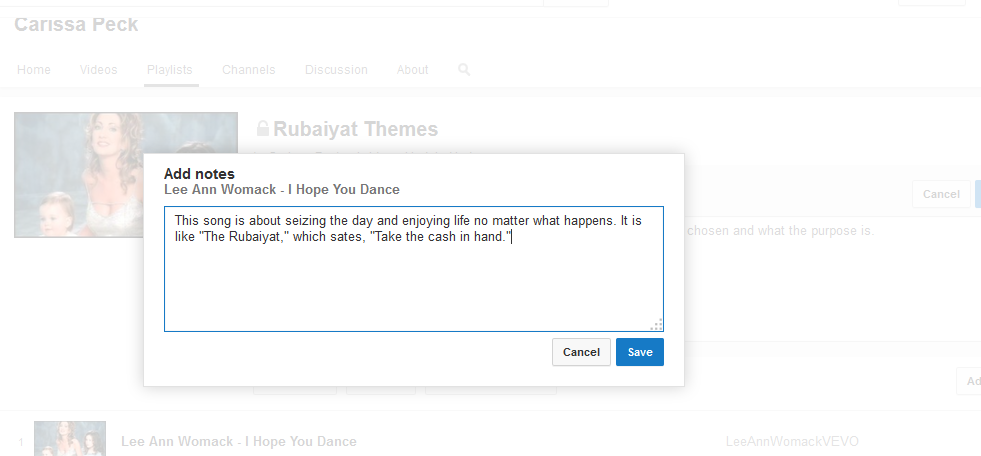
      In addition to writing about the whole playlist, students have the chance to quickly (in 150 characters or less) explain why they choose a song. I usually require my students use a quote here, but you could alter the requirements as you saw fit.


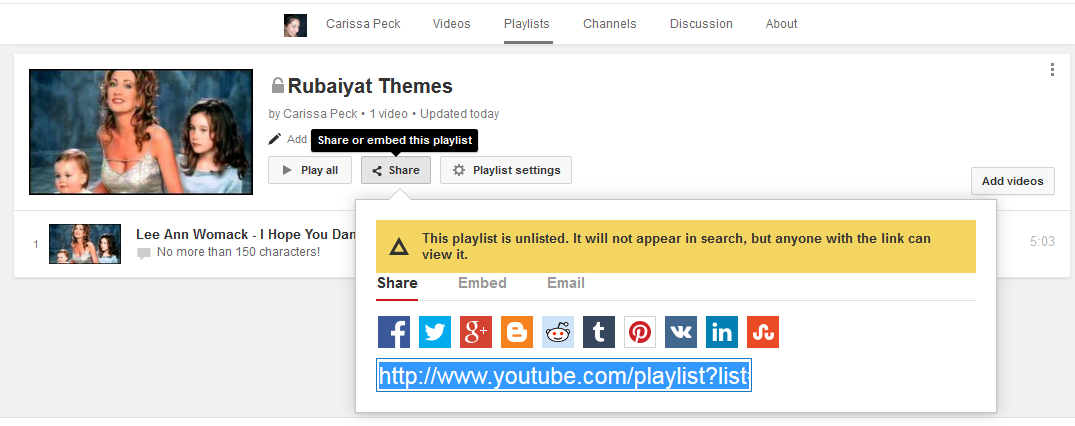
      Song 5 Sharing
      Your student has made a fantastic playlist...now how do they get it to you?! Just click the share button to get a link. They can also embed the playlist in a blog if you have students create blogs.


      If you prefer videos check out the YouTube video:


      Voila! If anything is unclear, or you aren't sure why it was done a certain way please ask me! I am happy to help you out so that you can try this out with your students!

      Friday, January 23, 2015

      Coding for Teens

      I recently saw a celebrity interview ( I am ashamed to admit that I don't remember who) where he said something along the lines of: I think every student should learn coding. It was like typing when I was younger. Everyone thought typing classes were a joke, but now everyone types everything.


      I agree! I think that in ten years people who code will have a head start on those who don't.

      I believe that students and schools are realizing more and more that in addition to learning facts, students need to learn how to use them. In other words, more than learning how something works, they need to figure out how it works by actually making or creating it.


      There are lots of websites and apps out there to help people learn how to code. There's a free one going on right now i wanted to share with you from webucator.
      1. To find it you go to their Self-paced Courses page. 
      2. Browse through the courses to find the course you want to take!
        • For coding, webucator suggests Java Training, PHP training or Javascript Training
      3. Click on the Order Now button next to the course. 
        • Ignore the prices because I am about to give you a coupon!
      4. Enter CODE4KIDS for the Coupon Code and click Validate Coupon.
      5. Agree to the Fine Print
        • By using the CODE4KIDS coupon, you certify that you are registering students who are at least 13 years old. NOTE: enter the student's information on the billing and student registration forms. USE A UNIQUE EMAIL ADDRESS FOR EACH STUDENT.
        • When signing up you agree that instructor support is limited to content covered in the course. 
      6. Problems? For any registration questions, you can email: code4kids@webucator.com.
      I won't lie, I haven't tried these courses, but any time I can pass on savings that help educate your students and save hundreds of dollars I'm sure to do it.

      There are other sites, so if you dislike that one don't quit on coding! Check out www.codecademy.com http://code.org http://www.codeavengers.com/ This year I plan to take a course and then post an updated blog about how I would use it in the classroom, but for now I am sure you can find tons of information out there to help you:)

      Plus, if you have any students who don't do anything in English outside of school, this may be a way that they will spend more reading, which will undoubtedly help their English in your class!

      Let me know if any of your students take the course and what they think!

      Thursday, January 22, 2015

      Infographics for Novels

      I finally have a moment to post about a great project that I did with my students last semester. We were reading Julius Caesar and I wanted them to work on their digital skills in a way that isn't just technology. I also wanted them to practice their essay skills without writing an essay.

      I decided to make an infographic project! They had to compare (or contrast), William Shakespeare's Julius Caesar to Tina Fey's Mean Girls. There are other movies you can do this to (21 is one I've seen many teachers do), but I like Mean Girls because the high schoolers can really relate to it. Plus, I teach a lot of exchange students from other countries. Since my school is private, I appreciate the ability to point out that no, not every public high school in America is like their pop portrayal.

      The assignment:
      Mean Girls, has a lot in common with Julius Caesar. Just look at the themes! However, since the movie and play have vastly different settings, and audiences, it isn't just a modern adaptation (like Ten Things I Hate About You and Taming of the Shrew). In your infographic, create an analysis of the play vs. movie where you argue the basic story of Julius Caesar was changed specifically because one one thing. Please support your ideas with at least 6 pieces of textual evidence (three from the movie, and three from the play).
      For example: They could argue that because Regina was much younger than Julius Caesar, the movie becomes a comedy rather than a tragedy.

      I got students started by telling them they could think about which characters were alike, and then why they are different.
      For example:
      Cady -Brutus
      Janis-Cassius
      Regina-Julius
      Many students also want to say Gretchen is like Caesar (mainly because of her monologue where she suggests Brutus is just as cute as Caesar. Give freedom here! Whatever makes the most sense to them, is what they should support.


      They could also look at the setting
      For example:
      Students High School vs Politicians and Soldiers in Rome
      60BC vs 2004
      A small town near Chicago, Illinois vs The Roman Empire

      And anything else they found interesting! Heck if they wanted to I'd be happy if they wrote about fashion, or diction.

      Some example, "thesis statements" from my students (you can see their complete infographic by clicking on the links)

      This was a great way to get them practicing essay writing skills, without making them write essays. They needed to find support (quotes), interpret the quotes, and analyze them to support their argument.

       It was challenging, but they really enjoyed it!

      This could have been done entirely as a homework assignment, but we spent two days working on it in the computer labs my school has on campus.

      There are quite a few infographic tools to choose from. I let my students select their own, but in the future, I plan on limiting it to one site. This time troubleshooting the whole class got complicated as they each needed different directions.

      The three sites I suggested to my students were:
      http://piktochart.com/ 
      https://venngage.com/
      http://www.easel.ly/

      They were all free sites and I thought they all worked just fine. My students seemed to prefer piktochart. I would suggest you find the one that you like the most since you'll be the one answering their questions.

      That's it! Has anyone else used infographics with their students? I am looking forward to including them in my speech class!

      Wednesday, January 21, 2015

      Alula - Great Creative Writing App

      There's always that great go-to assignment whenever you need a no prep activity. You have one student say/write the start of a story, "Once upon a time there were three beautiful butterflies."Then the next student would continue the story, "They wanted to be explore the world, but they were afraid their wings wouldn't fly."

      I am going to discuss three reasons I love this app for my students, and a few ways I think you can use it, and include a video showing you how it works.

      1. I hate to say it, but the app is free. When you use as many different apps as I do in class it can be tough to charge students all the time. So, when you find a great free app, it kinda feels like you won the lottery.

      2. It is offered on iTune and Google Play. My classes are about equally divided between Mac lovers and Mac haters, so having an app that works on both devices is great.

      3. It is ridiculously user friendly. A fast sign up and voila, you're ready to get creative. Also, because the stories are so short, students shouldn't get overwhelmed.

      As far as how to use it:
      1. Have students collaborate to make stories. Then vote on the best.
      2. Have students select their favorite quotes from a text that you are reading in class to start an Alula. See how others change the meaning from the original text.
      3. Have students pick a story that they like and make it longer on their own.
      4. Choose a story that has some errors and have students correct it.
      5. And more!

      What's it look like? Check out:

      Tuesday, January 20, 2015

      Pensoul in Class


      As I have mentioned before I am not an artist. Yet, we've all read the studies, and we know that, especially with students who are newer to English, there is a need to use visuals when teaching.

      I've recently been using an app called PenSoul to create amazing graphics I can use in my class.

      Since I got a little excited about how easy it is to use, I made a short list of other ways to use the app.
      • Have students create their own book covers for a novel
      • Have students create a WANTED poster for a character in the story
        • Be sure they include traits in addition to their picture
      • Let students use the app to create a fake Instagram picture or Tweet of a character
      • Encourage students to create art that they feel a character would have made.
      • Make a menu that the characters would have enjoyed (include pictures of the food!)
      And so much more! What would you have them do?

      Tuesday, January 13, 2015

      7 Online Tools to Show Your Students' Writing Talent

      Today a guest blogger is joining us to write about different tools you can use online to show off your writing with others. I think this is a really awesome way to get students motivated. After all, you want their audience to go further than you, don't you? Then they can become famous writers and quote you as their motivation...or maybe just enjoy writing homework a bit more.

      Throughout the blog I've inserted my thoughts on how to really apply this site to your class and students. Whenever you see the writing in italics, that's me. Everything else is the very talented Veronica.

      Writing is not just a talent but also a skill that students should continuously develop and share to others. In fact, if good writers, can definitely use it to attain income and to finally establish themselves as professional writer. Thanks to the Internet there are now various tools and platforms that you can use to showcase your writing talent and eventually, establish careers. Here are the 7 online tools to show off writing talent:

      Writer.lyhttps://writer.ly/
      If you are searching for jobs where you can earn legitimate income, Writer.ly is a website where people searching for writers and professional writers can meet. With this website, clients can post a job and find the people they need. From editors, book designers to book marketers, it is now much easier and more convenient for writers and freelancers. Freelancers, just post their resumes and bid on the available jobs.
      Create a class account and donate any funds made to charity!

      Figment.com http://figment.com/
      Showcasing your talent is essential especially if you really want to pursue this career. To do this, you also have to keep on improving and honing your craft. Using online platforms, there are several websites available for writers. Figment.com is one great site where you get to have almost all of the things that you need as a writer. This is a perfect platform where you can share your passion. The site has a lot of useful online resources that you can use as a writer. Apart from being able to do your passion, you can also get the chance to share it with others and to interact with other writers. You can actively participate in groups and forums where you can learn from others and also share what you know.
      Some of the resources are great to use on a class-wide level. Otherwise, this is a useful site for students to get exposed to having their work, "out there."

      Etymonline.comhttp://etymonline.com/
      When you are a writer, you have to keep on improving and honing your writing skills. In writing, there are several aspects, elements and techniques that you have to learn. You also have to keep on improving your vocabulary. One great site that you can use for this purpose is Etymonline.com. This site is an online etymology dictionary where you can get comprehensive explanation of words. The site is really useful especially if you want get to know more about the words that are often used. With this website, you can learn many things about classics and words that may often be lost in translation.
      This is an AWESOME site to use with students. Once they understand why a word means something, they are less likely to forget the meaning
      .
      Allcorrect.org http://allcorrect.org
      A prolific and effective writer should write content free from any grammar or spelling error. With so many things that you have to do, you may not have the time to do the editing and proofreading on your own. The good news is that you can always seek for professional editing and proofreading services. If you do not have the time to go over your written work, you can avail the services offered by Allcorrect.org. The site is known to have the best editors and proofreaders. For years, they have already established their reputation in the business. So, if you are looking for a firm that can offer you quality editing services, All Correct is one of the best choices out there.
      I wouldn't use this with a high school class, but I don't think there's anything wrong with showing students that even professionals get their work proofread! This may motivate them to get their work checked by a friend before submitting it.

      Scrivener http://www.writersstore.com/scrivener/
      When writing, it is not just the quality and the kind of content. You also have to take into consideration the structure and the formatting. This is where most writers are having a hard time. With ideas overflowing and with the details you want to add, this can be challenging. The nice thing is that you can use the tool Scrivener. This is a tool that you can use for content generation. In using Scrivener, you get to control the formatting. The tool works as a complete writing studio that can make it easier for you to organize your thoughts and finished works.
      This costs about $40 and is great for your more disorganized students.

      Soundgecko.com http://soundgecko.com/
      The Internet has a lot of online resources and materials that you can use to show your writing talent and to improve your skills. Another great tool that you can use is Soundgecko.com. This platform allows you to listen to new, websites and even documents. Even if you are so busy or if you are traveling, you can listen to materials online. The tool is very easy to use since you can use it even if you are accessing the Internet through your mobile device. With Soundgecko.com, it only takes seconds to listen to articles, blogs and documents. To utilize the complete features of this tool, you can just pay $2.95 per month.
      If you have a student who is a really slow reader, practice makes perfect! However, sometimes, to help them catch up, you can let them listen to assignments instead.

      Writing.com http://writing.com
      This site is a well-known online community for writers. Launched in 2001, Writing.com is the perfect place where you can share your creativity and skill as a writer. If you are in search for a place where you can share your work or if you are looking for a reader who can provide feedback, this is the site for you. You can join for free. Once you have registered, you can have your create your online writing portfolio for free, share your work, participate in various contests and activities, make use of writing tools and a whole lot more. The site also enables you to communicate and interact with other writers who share the same creative minds like you.
      With the readily available tools that you can use to showcase your talent, you can effectively use them to develop your skill and to be recognized as a writer. It may take months or years but definitely it would not happen overnight. But with continuous work and persistence, you can make it big in the industry.
      Did someone say contests??? I know my students love some competition, don't yours?

      About the author: This article is a guest post by Veronica May, an experienced editor and blogger. She has written for multiple online publications, where she strives to share her knowledge and opinions. Her main focus is covering a variety of topics in the field of education.
      Related Posts Plugin for WordPress, Blogger...